In today’s fast-paced retail and hospitality industries, businesses need reliable technology to manage sales, track inventory, and deliver excellent customer service. An EPOS system (Electronic Point of Sale system) provides an efficient way to handle transactions, monitor business performance, and simplify daily operations.
Whether you run a retail shop, restaurant, café, or growing multi-site business, investing in the right EPOS solution can help improve efficiency, reduce manual work, and give you greater control over your operations.
In this guide, we’ll explore what an EPOS system is, its key benefits, essential features, and how to choose the right solution for your business.
What Is an EPOS System?
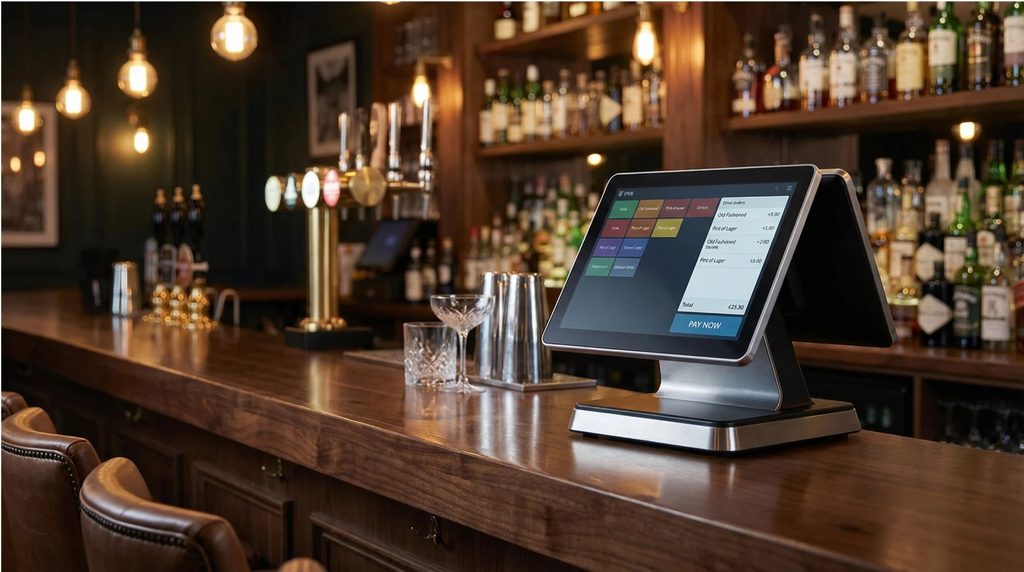
An EPOS system is a digital solution that combines point-of-sale hardware and software to process transactions and manage business operations. Unlike a traditional cash register, an EPOS system can connect sales, inventory, reporting, and other business functions in one central platform.
A typical EPOS setup may include a touchscreen till, barcode scanner, receipt printer, cash drawer, payment terminal, and specialised EPOS software.
Depending on the system, businesses can also access cloud-based reporting, customer management tools, employee tracking, and integration with accounting or e-commerce platforms.
By bringing these functions together, an EPOS system helps businesses work more efficiently and make informed decisions based on sales data.
Key Benefits of an EPOS System
1. Faster and More Efficient Transactions
An EPOS system allows staff to process purchases quickly using touchscreen menus, barcode scanning, and integrated payment solutions. This can help reduce queues, improve checkout efficiency, and create a smoother customer experience.
For busy shops, supermarkets, cafés, and restaurants, faster transactions can make a significant difference during peak trading hours.
2. Real-Time Inventory Management
Managing stock manually can be time-consuming and prone to errors. Many EPOS systems automatically update inventory as products are sold, giving businesses a clearer view of stock levels.
Depending on the software, you can set low-stock alerts, review product performance, and identify items that need replenishing. These features can help reduce stock shortages and overstocking.
3. Accurate Sales Reporting
Understanding your sales performance is essential for business growth. An EPOS system can generate reports covering revenue, popular products, transaction volumes, and sales by employee or location.
With access to reliable sales data, business owners can identify trends, adjust stock levels, and make better-informed purchasing and promotional decisions.
4. Improved Customer Experience
Modern EPOS systems can support loyalty programmes, customer profiles, discounts, gift cards, and integrated payment options.
For hospitality businesses, features such as table management, order customisation, and kitchen printing can help improve service. Retailers may benefit from faster product searches, promotions, and a more organised checkout process.
5. Better Employee and Business Management
Many EPOS solutions include employee accounts, permissions, shift reporting, and sales performance tracking. These features help managers monitor operations while controlling access to sensitive functions.
For businesses operating multiple locations, centralised reporting can make it easier to compare performance and maintain consistent processes.
Essential Features to Look for in an EPOS System
Not all EPOS solutions offer the same functionality. Before choosing a system, consider the features that best match your business requirements.
- Touchscreen interface: A user-friendly till interface helps staff learn the system and process transactions efficiently.
- Inventory management: Stock tracking, product management, and reorder alerts help keep inventory organised.
- Barcode scanning: Compatible barcode scanners can speed up checkout and reduce manual entry.
- Receipt printing: A compatible receipt printer supports printed receipts and transaction records.
- Payment integration: Integrated payment terminals can simplify checkout, subject to provider and software compatibility.
- Sales analytics: Reporting tools provide insights into revenue, product performance, and business trends.
- Cloud access: Cloud-enabled systems can allow authorised users to review business information remotely.
- Employee management: User permissions and staff reporting help support accountability.
- Third-party integrations: Compatibility with accounting, e-commerce, loyalty, and inventory platforms can reduce duplicate data entry.
- Security and backups: Look for suitable user access controls, software updates, and reliable backup arrangements.
Selecting an EPOS system with the right combination of features can help you avoid unnecessary costs while ensuring your business has the tools it needs.
EPOS Systems for Different Industries
An EPOS system can support businesses across a wide range of sectors, but the best configuration depends on how each business operates.
EPOS Systems for Retail
Retailers need efficient checkout processes, accurate stock control, and clear sales reporting. An EPOS system connected to barcode scanners and receipt printers can help manage products, process purchases, and monitor inventory.
Clothing stores, convenience shops, electronics retailers, and specialist stores can benefit from features such as product variants, promotions, and customer loyalty tools.
EPOS Systems for Restaurants and Cafés
Restaurants and cafés often need more than basic sales processing. Hospitality-focused EPOS software may include table management, menu customisation, order routing, kitchen printers, and takeaway order management.
These capabilities can help staff coordinate orders and improve communication between front-of-house and kitchen teams.
EPOS Systems for Supermarkets and Convenience Stores
High-volume retail environments require fast barcode scanning, dependable transaction processing, and effective stock management.
A suitable EPOS setup can help businesses handle frequent transactions, manage product prices, and monitor sales across different categories.
EPOS Systems for Mobile Businesses
Market stalls, pop-up shops, mobile vendors, and businesses attending events may benefit from portable EPOS devices and compatible payment solutions.
When choosing a mobile setup, consider battery life, connectivity, portability, and whether the system can continue operating when the internet connection is interrupted.
How to Choose the Right EPOS System for Your Business
Choosing the right solution requires more than comparing hardware prices. Consider these practical steps before making a decision.
1. Identify your business requirements. Determine whether you need retail checkout, restaurant ordering, inventory management, customer loyalty, or multi-location reporting.
2. Choose suitable hardware. Consider touchscreen terminals, barcode scanners, receipt printers, cash drawers, and payment devices based on your workflow.
3. Check software compatibility. Ensure your chosen hardware works with the EPOS software and any third-party applications you currently use.
4. Compare the total cost. Review hardware prices, software subscriptions, payment processing charges, installation, maintenance, and support costs.
5. Evaluate ease of use. A straightforward interface can reduce staff training time and help minimise mistakes.
6. Review connectivity and security. Check internet requirements, offline capabilities, software updates, access controls, and data backup arrangements.
7. Consider future growth. Choose a system that can accommodate additional products, employees, terminals, or locations as your business expands.
Taking the time to evaluate these factors can help you choose an EPOS solution that delivers long-term value.
Why Invest in a Modern EPOS System?
An EPOS system is more than a checkout tool. It can become an important part of your business operations by connecting sales, stock management, reporting, and customer service.
With the right combination of hardware and software, businesses can reduce repetitive administrative tasks, improve transaction accuracy, and make better use of their sales data.
The key is to choose a solution that fits your business today while offering the flexibility to support future growth.
Find the Right EPOS System for Your Business
Whether you operate a retail store, restaurant, café, or mobile business, the right EPOS system can help streamline daily tasks and improve operational visibility.
At Barcodes for Business, you can explore business technology solutions, including EPOS hardware, barcode scanners, receipt printers, and other essential point-of-sale equipment.
Compare the available options and choose compatible hardware that meets your business needs, budget, and workflow.